


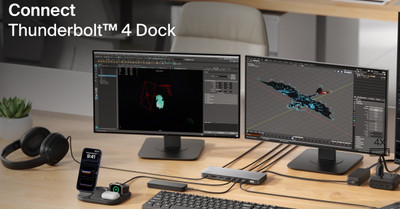
Belkin Connect Thunderbolt 4 Dock & Wireless Charger: The Ultimate Workspace Upgrade
Headphones SG on 23rd May 2026
Modern workspaces demand more than just a laptop and charger. Whether you’re a creative professional, remote worker, gamer, or multitasker, cable clutter and limited ports can quickly slow down your productivity. That’s where the Belkin Connect Thunderbolt 4 Dock & Wireless Charger steps in — combining powerful connectivity, fast charging, and streamlined desk organization into one premium setup.
A Dock Designed for Serious Productivity
The Belkin Thunderbolt 4 Dock transforms a laptop into a complete workstation using a single Thunderbolt connection. It supports transfer speeds up to 40Gbps, delivers up to 96W Power Delivery, and offers 14 ports for displays, storage devices, Ethernet, audio, and accessories.
For professionals working with large media files or multiple monitors, the dock supports triple 4K displays at 60Hz on compatible Windows systems, while macOS users can enjoy dual extended displays.
The dock includes:
- Thunderbolt 4 ports
- HDMI and DisplayPort outputs
- USB-C and USB-A connections
- SD and microSD card readers
- 2.5Gb Ethernet
- Audio input/output
This setup eliminates the constant need for dongles and adapters while keeping your workspace organized and efficient.
Wireless Charging Meets Minimalist Design
Pairing the dock with a wireless charger creates a cleaner and more convenient desktop experience. Instead of juggling multiple chargers and cables, users can simply place compatible smartphones or earbuds onto the charging pad while the dock powers the rest of the workstation.
The result is a streamlined setup that feels modern, efficient, and far less cluttered.
For users working long hours at a desk, this convenience matters more than expected. A single organized workstation helps reduce distractions, improves cable management, and makes transitioning between devices effortless.
Built for Creators and Multitaskers
The Belkin dock is especially useful for:
- Video editors handling high-resolution footage
- Graphic designers using multiple displays
- Hybrid workers switching between home and office
- Gamers managing peripherals and streaming gear
- Business professionals needing reliable Ethernet and charging
Because the dock supports daisy-chaining Thunderbolt devices, users can expand their workstation even further without sacrificing speed or performance.
Real-World Performance and User Feedback
Many users praise Thunderbolt docks for simplifying their desk setup and enabling one-cable connectivity. However, some community discussions have noted occasional compatibility or charging issues on certain MacBook configurations and older laptops.
In most cases, the best experience comes from using devices with full Thunderbolt 4 or USB4 support. Users should also verify monitor compatibility and operating system requirements before purchasing.
Despite occasional compatibility concerns shared online, Belkin’s dock remains popular for its premium build quality, wide port selection, and high-speed connectivity.
Why the Belkin Connect Thunderbolt 4 Dock Stands Out
What separates this dock from cheaper USB-C hubs is its combination of speed, power delivery, and workstation-level versatility.
Key highlights include:
- Up to 40Gbps data transfer speeds
- Support for multiple 4K displays
- 96W laptop charging
- 14 versatile ports
- Reliable wired networking
- Thunderbolt 4 certification
- Cleaner cable management
Final Thoughts
The Belkin Connect Thunderbolt 4 Dock & Wireless Charger setup is more than just an accessory — it’s a productivity upgrade. It simplifies connections, reduces desk clutter, and gives users the power to build a professional-grade workstation from a single laptop connection.
For anyone tired of limited laptop ports, tangled cables, or juggling multiple chargers, this setup offers a clean and powerful solution designed for modern work and entertainment.